Cartography Now Maps Permissions Across All Three Major Clouds: My LFX Mentorship Journey
Last fall (2025), I got the chance to jump into the Linux Foundation’s LFX Mentorship program (Term 3) and work on Cartography — this super cool open-source security tool that throws all your technical assets and their relationships into a graph database. My goal was to extend Cartography’s Resource Permission Relationships (RPR) feature (which was AWS-only at the time) to also work with Azure and Google Cloud Platform (GCP).
What is Cartography?
With cloud providers multiplying, keeping track of access has quietly become one of the messiest problems in cloud security. At some point, “who can access what?” stops being a simple question and starts feeling like a full-time investigation.

So Cartography is basically this Python tool that takes all your infrastructure, identities, and permissions and throws them into a Neo4j graph database. Instead of trying to piece together who can access what from a million different places, you can just query the graph. It’s like having a map of your entire cloud infrastructure, you can track everything from a single window.
What Resource Permission Relationships Do
Resource Permission Relationships (RPR) precompute permission mappings between cloud principals and resources, storing them as graph relationships. Instead of manually checking who can access what, you can query the graph with simple Cypher queries like “who can read my SQL Server?” and get instant answers.
Why it’s efficient: Azure and GCP have hundreds of built-in roles and permissions. Calculating relationships for everything would be slow and wasteful. RPR lets you define exactly which permission relationships matter to you through simple YAML config files.
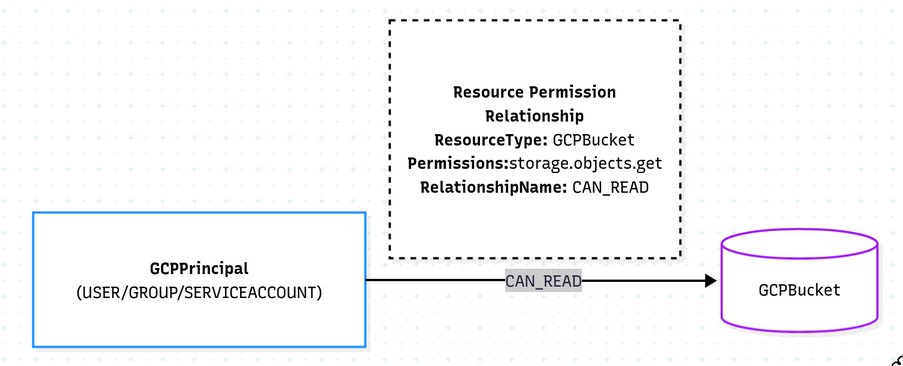
How to use it: Just add entries to your permission relationship YAML file. For example, to track who can read GCP Storage Buckets:
- target_label: GCPBucket
  permissions:
  - storage.objects.get
  relationship_name: CAN_READ
This creates (:GCPPrincipal)-[:CAN_READ]->(:GCPBucket) relationships in the graph, which you can query instantly. Use --azure-permission-relationships-file or --gcp-permission-relationships-file to specify your custom YAML file.
Understanding Azure RBAC
Azure decided to do things their own way (of course). Here’s how it works:
- Principals (EntraUser, EntraGroup, or EntraServicePrincipal) get assigned Azure Roles
- Each role has a bunch of permissions (like
Microsoft.Sql/servers/read) - These role assignments are scoped to resources or resource groups
- Permissions are evaluated based on role assignments at the resource level
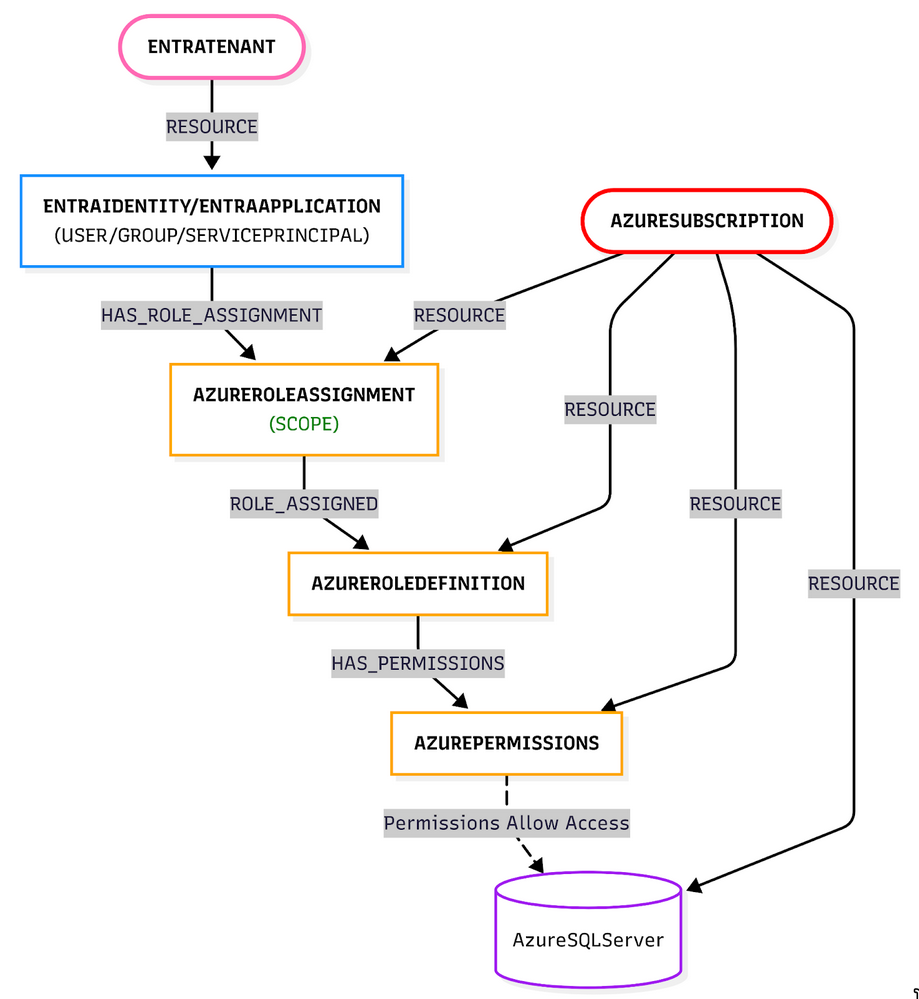
So to figure out if a user can read an Azure SQL Server, Cartography needs to:
- Find all role assignments for that user (including groups they’re in—because group expansion is fun)
- Check if any of those roles have the
Microsoft.Sql/servers/readpermission - Make sure the role assignment scope actually matches the SQL Server resource
- If everything checks out, create a
(:EntraUser)-[:CAN_READ]->(:AzureSQLServer)relationship
Sounds straightforward, right? Well… mostly. The scope matching part got interesting, but we’ll get to that.
Understanding GCP IAM
GCP’s IAM system is similar to Azure’s RBAC:
- Principals (GCPUser, GCPServiceAccount, or GCPGroup) get IAM Policy Bindings
- Each binding has roles with permissions (like
storage.objects.get) - Permissions are evaluated at the project, folder, or organization level
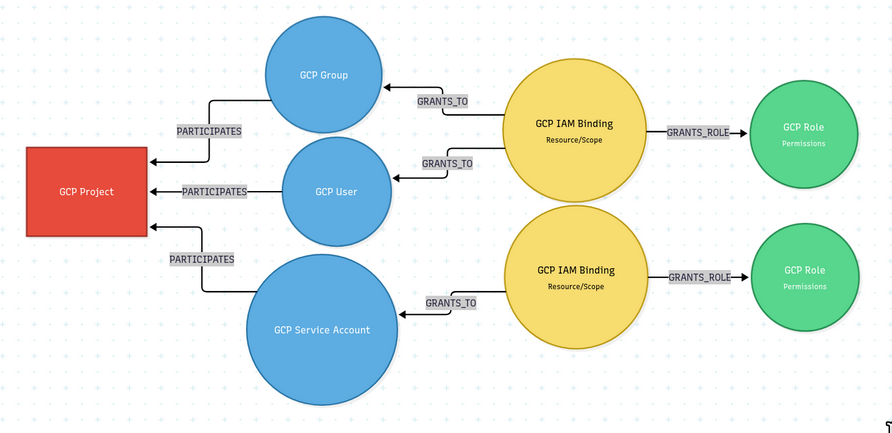
To figure out if a principal can read a GCP bucket, Cartography:
- Finds all policy bindings for that principal (including group memberships)
- Checks if any bindings have the required permission
- Verifies the binding scope matches the resource
- Creates
(:GCPPrincipal)-[:CAN_READ]->(:GCPBucket)if everything checks out
Why This Is Hard Without Cartography (The Manual Way Is Lame)
So you want to know who can read your Azure SQL Server. Without Cartography, that means opening the Azure Portal (or juggling CLI/PowerShell), finding the right SQL Server, checking IAM role assignments, decoding what each role actually allows, manually expanding groups, and double-checking scopes—all for a single resource.
Now repeat that for every SQL Server, and again for every subscription. If you’re doing this at scale, congratulations: you’re either clicking through the portal for hours or maintaining fragile scripts that break every time Azure sneezes.
Now imagine not doing any of that…
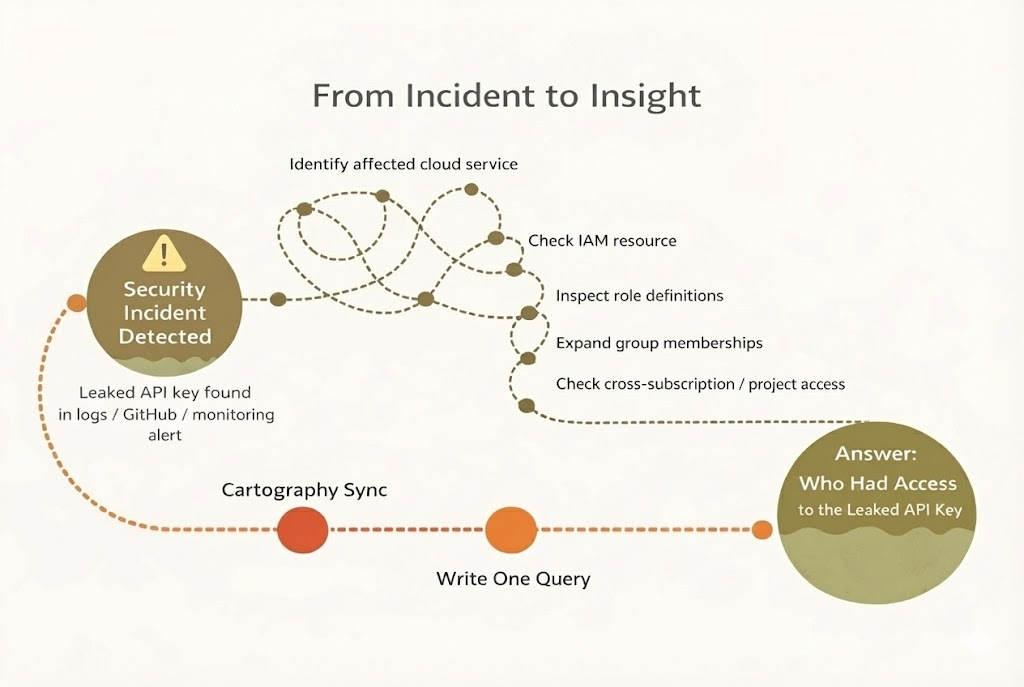
Why Cartography is better: All that data is already in the graph. You write one Cypher query, and boom—you have your answer. Plus, you can query across resources, across subscriptions, and even across cloud providers. Try doing that with the Azure Portal!
How I Learned to Stop Worrying and Love the Graph
Following Cartography’s established patterns, I implemented RPR for both Azure and GCP using the same general approach:
1. Parse Permission Relationship Files
Both Azure and GCP RPR use YAML configuration files (similar to AWS) that define which permission relationships should be created:
Azure example:
- target_label: AzureSQLServer
  permissions:
  - Microsoft.Sql/servers/read
  relationship_name: CAN_READ
GCP example:
- target_label: GCPBucket
  permissions:
  - storage.objects.get
  relationship_name: CAN_READ
2. Gather Principal and Resource Data
For each cloud provider, I implemented functions to:
- Azure: Query Neo4j for all EntraUser, EntraGroup, and EntraServicePrincipal nodes with their role assignments and permissions
- GCP: Query Neo4j for all GCPPrincipal nodes with their IAM policy bindings, roles, and permissions
3. Evaluate Permissions
The core logic evaluates whether a principal has the required permissions for a specific resource:
-
Check if the principal has a role assignment with the required permission
-
Verify the role assignment scope matches the resource
-
Verify allowed permissions match
-
Handle group membership expansion (users are connected to groups in Neo4j, giving us the full picture, its pretty neat)
4. Create Relationships
Once permissions are evaluated, Cartography creates MatchLink relationships in the graph:
- Azure:
(:EntraUser|EntraGroup|EntraServicePrincipal)-[:RELATIONSHIP_NAME]->(:AZURE_RESOURCE) - GCP:
(:GCPPrincipal)-[:RELATIONSHIP_NAME]->(:GCP_RESOURCE)
These relationships are created using Cartography’s MatchLink system, which connects existing nodes in the graph based on permission evaluations.
Technical Challenges (More Fun Than Expected)
Scope Matching: The Hierarchy Game
GCP role bindings can be scoped at different levels:
Organization (everything)
└── Folder (multiple projects)
    └── Project (multiple resources)
        └── Individual resource (just this one thing)
I had to implement scope resolution logic to figure out if a role assignment actually applies to a specific resource. This meant understanding GCP’s (and eventually Azure’s too) resource hierarchy and checking if a resource falls under a given scope. It’s like a game of “does this resource belong to this scope?” and the answer isn’t always obvious.
Performance Optimization: Making It Fast
Both implementations needed to be efficient because we’re potentially processing thousands of principals and resources. Nobody wants to wait hours for a sync to finish. I optimized by:
- Pre-compiling permission patterns and scopes (compile once, use many times)
- Batching Neo4j queries where possible (fewer round trips = faster)
- Using efficient data structures for lookups
The goal was to make it fast enough that people would actually use it. So far, so good!
The Conditions Question
GCP IAM bindings can include conditions — things like time-based restrictions or resource name matching — that limit when a permission actually applies. Early on, we realized that if we evaluated bindings with conditions the same way as unconditional ones, we'd end up creating permission relationships that don't always hold true (i.e., false positives).
After discussing it with Alex, we decided the right call was to only evaluate bindings without conditions for now. That way, every relationship RPR creates is accurate — you might get an incomplete picture, but you'll never get a misleading one. Supporting conditions is tracked in #2250 and is a natural next step for making RPR more complete.
Putting RPR to Work (The Fun Part)
Now for the good stuff! With Azure and GCP RPR implemented, security teams can ask all sorts of powerful questions across AWS, Azure, and GCP. Let’s see with a basic example, what you can do:
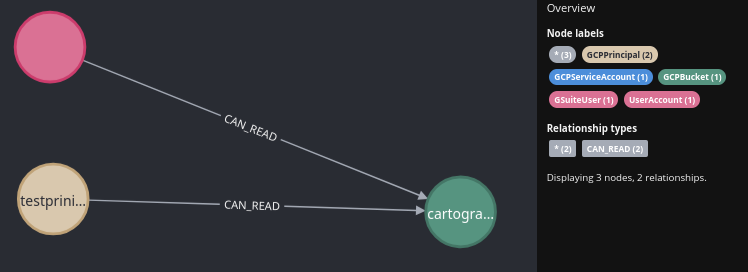
Find who can read GCP buckets:
MATCH (bucket:GCPBucket)<-[r:CAN_READ]-(principal:GCPPrincipal)
RETURN bucket,r,principal
This query returns all GCP principals (users, service accounts, or groups) that have IAM policy bindings with permissions like storage.objects.get for the specified bucket.
My LFX Mentorship Experience
Working on Cartography through the LFX Mentorship program was honestly one of the best learning experiences I’ve had. I got to work closely with some amazing people:
- Alex Chantavy - My mentor, who patiently answered all my questions about Cartography’s architecture, reviewed my code (and caught all my mistakes), and taught me best practices. Also a buddy for my next Baldurs Gate run 😄
- Kunaal Sikka - Another super sweet mentor who answered all of my questions and taught me some of the core principles of Cloud Security and Cartography itself.
One of the coolest parts was realizing that the feature I built would actually be used by security teams to answer real questions about their cloud infrastructure. That’s pretty wild when you think about it!
The ability to query “who has access to what” across AWS, Azure, and GCP in a single graph database is honestly powerful for organizations operating in multi-cloud environments. No more jumping between three different consoles trying to piece together permissions. Just one query, and boom—you have your answer.
Conclusion (That’s a Wrap!)
I hope you found this post useful and maybe even a little bit fun!
If you're running multi-cloud and tired of piecing together permissions across consoles, give RPR a try — the Cartography docs have everything you need to get started. And if you want to help make it even better (like adding conditions support 👀), the project is always welcoming contributors at github.com/cartography-cncf/cartography.
Implementing Resource Permission Relationships for Azure and GCP was challenging but super rewarding. I learned a ton about cloud security, graph databases, and open source development. Big thanks to the Cartography maintainers, especially Alex Chantavy and Kunaal Sikka, for being awesome mentors throughout the LFX Mentorship program. They put up with all my questions and helped me build something actually useful!
Thanks for reading, and happy querying!